


Be Closer: GPS Family Location
4.41.84K Reviews
App Specs
- Version
- 4.8.7
- Updated On
- License
- Free
- Downloads
- 10,000,000+
- Developer
- Golden Gate Media
- Categories
- Parenting
- Platform
- Android
Screenshots
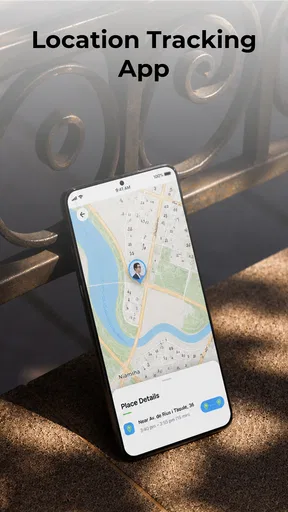
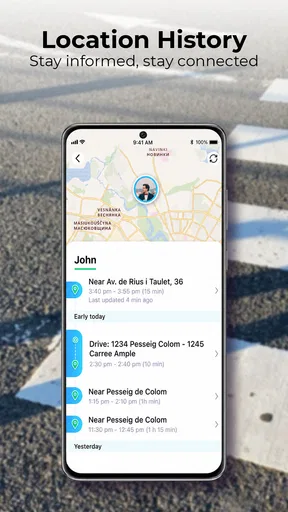
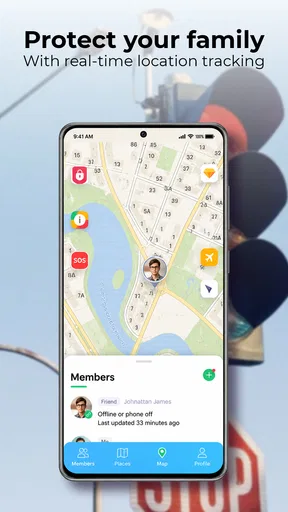
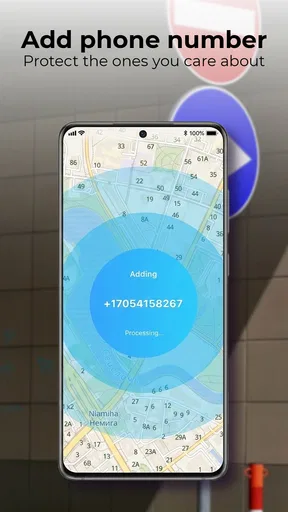
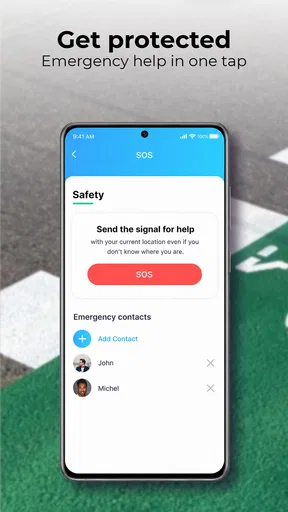
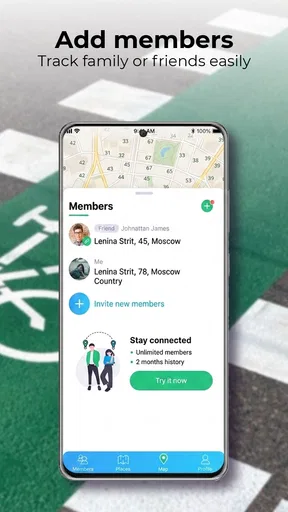
 Analysis by AppCompare
When several people in a family are moving in different directions, a shared location app can make everyday coordination easier—but only if everyone is comfortable using it. I see Be Closer: Family location as a practical way to check where family members are and make simple plans around that information, rather than as a substitute for a phone call or a conversation about trust. Its value depends less on the map itself than on whether your household agrees on when and why to share locations.
What the free starting point does—and does not—settle
The app is free to download, which makes it easy to try before deciding whether it belongs in your family’s routine. It also offers in-app purchases, with items ranging from $1.99 to $64.99. That range matters: “free” describes getting started, not necessarily every option you might encounter. I’d begin without buying anything, work out whether the family actually uses the shared location view, and consider a purchase only after identifying a specific need it would meet.
That approach also helps avoid paying for a solution to a problem your household doesn’t have. If the main need is simply telling one another when someone is on the way, ordinary messages may be enough. If family members regularly need to coordinate arrivals without interrupting one another, a location-sharing app can be more convenient. The useful question is not whether paid options exist, but whether they add something your group would use often enough to justify the cost.
Value comes from a shared routine, not just a map
The strongest case for this kind of app is reducing small bits of uncertainty: a parent can check whether a teenager has reached an agreed destination, or relatives can coordinate a pickup without sending repeated “where are you?” messages. Those benefits only appear when the relevant people have joined and chosen to share. A map with missing family members is not a reliable family plan, so I’d treat setup as a group decision rather than something one person quietly installs and expects everyone else to follow.
For a family that already communicates openly, location visibility can be a helpful extra layer. For a household that expects the app to resolve disagreements, enforce rules, or guarantee safety, it is the wrong tool. A displayed location can help someone decide whether to call, but it cannot explain why a person stopped somewhere or confirm that everything is fine. Use it as a coordination aid, not as proof or supervision by itself.
How it fits into everyday family life
A realistic use is a busy afternoon when one adult is collecting a child while another is finishing work. Instead of interrupting each other with several messages, the family can check the shared map and decide whether to wait, leave, or arrange a different pickup. The useful part is not watching every movement; it is having enough context to make a practical decision. I’d still send a direct message if timing matters, because a location view and a conversation answer different questions.
It may also help during a crowded family outing. If relatives have agreed to share their whereabouts, checking the map can make it easier to regroup after people split up. Before relying on that, decide on a simple fallback—such as a meeting point or a phone call—because phones can be unavailable, and a location display should not be the only plan for finding someone.
Worth Reading Before You Choose

Baby Panda World Brings Quick Play to Modern Phones, but Its Game Library Feels Busy

ESPN’s Live Game View Makes Following Close Games Easier

QuizzLand Review: A Good Fit for Short Trivia Breaks, Not Every Player

Basketball Stars: Multiplayer Is Fast, but Can It Recover When Matches Go Wrong?

WEBTOON Turns Phone Updates Into a Better Reading Routine

Link to Windows Runs on Shared Habits, Not Social Feeds
Compared with messages and general location sharing
Compared with a family group chat, this app is better suited to answering “where are we?” than “what are we doing?” Messages carry context, plans, and explanations; a map offers a quick visual reference. I would use both rather than expecting either one to replace the other. If your family already shares locations through a built-in phone feature and finds it dependable, switching may not add enough value to justify asking everyone to learn another app.
Compared with calling each person, a shared map can be less disruptive when the question is only about approximate coordination. But a call is still the better choice for urgent, sensitive, or ambiguous situations. This distinction is important: convenience can reduce unnecessary check-ins, yet it should not turn into an assumption that a person must always be reachable or explain every stop.
Small setup choices that make sharing more useful
Before inviting relatives, I’d agree on the purpose of the shared group and who belongs in it. A family may want one arrangement for parents and children and a different one for extended relatives, rather than making every location visible to everyone by default. Be Closer is described as supporting multiple circles or groups, which can help separate those relationships. Keep the membership deliberate and revisit it when circumstances change.
It is also worth agreeing on practical expectations: whether location sharing is meant for travel and pickups, whether people can pause it, and what the family should do if someone appears not to be moving. These conversations prevent a convenience feature from becoming an unspoken rule. For children, explain the purpose in age-appropriate language; for adults, make participation a mutual choice. Clear expectations matter more than a clever map setting.
For arrival and departure notifications, I’d start with only the places that solve a recurring coordination problem, such as home or school, rather than creating alerts for every destination. Too many notifications can become background noise, and family members may stop paying attention to them. A small, useful set is easier to understand and less likely to make the app feel intrusive.
Battery, accuracy, and the limits of location checks
Location sharing relies on a phone being available and able to report its position, so I would not treat every map update as a live guarantee. A device may be offline, its battery may be low, or its location may not reflect a person’s exact situation. If something seems inconsistent, contact the person directly instead of drawing conclusions from the map alone. That is especially important when plans are time-sensitive.
Background GPS use can also affect battery life. Families can make this trade-off more manageable by checking location when it is genuinely useful instead of repeatedly opening the map out of habit. If a child or adult has a long day away from a charger, the family should discuss whether constant sharing is worth the extra battery demand. In my view, a tool that creates more worry about a phone running out of power is not serving the household well.
Privacy deserves the same practical attention. Location information can reveal routines, so I would keep the circle limited to people who need access and make sure each person understands what sharing means. The app’s privacy controls are part of the appeal, but no setting replaces a family agreement about respectful use. If someone feels monitored rather than supported, the right response is to talk about the arrangement, not simply add more alerts.
Who is most likely to get value from it
I’d recommend trying it for households with busy schedules, regular pickups, or relatives who often meet in different places and want a quick way to coordinate. It can also suit parents who want a shared location check as one part of a broader safety routine. The app is aimed at parenting and family use, is rated for Everyone, and is developed by Golden Gate Media. It has an average rating of 4.5 from around 134,000 ratings, with more than 10 million installs; that level of uptake suggests many people find the basic idea useful, though it does not guarantee a fit for every family.
I would skip it if your household does not want ongoing location sharing, if most coordination already happens easily through messages, or if adding another app would cause more friction than it removes. It is also not the right choice for anyone seeking a covert tracking tool or a replacement for direct communication. The best use is transparent and limited: everyone knows who can see them and what the group is trying to coordinate.
The current version is 4.7.8, and the app was released on February 5, 2019. It requires Android 9 or later, so an older Android device may not be suitable. Those details are worth checking across the family before inviting everyone; a shared system works poorly if one person cannot install or use it on their phone.
My verdict after weighing the trade-offs
Overall, I think this is worth trying when a family has a clear, recurring reason to share locations. The free download lowers the barrier to testing that routine, while the in-app purchase range makes it sensible to decide on paid value only after seeing what your group needs. I would not pay simply because the option is there. First check whether the map, group setup, and alerts genuinely save time or reduce needless check-ins.
The main trade-off is straightforward: more awareness can make coordination smoother, but it also asks everyone to accept location sharing and the battery cost that may come with it. If your family can agree on sensible boundaries, the app can be a useful companion to calls and messages. If that agreement is missing, or a built-in sharing option already does the job, staying with your current approach may be the better choice.
Getting Started with Be Closer
First things first, downloading the app is a breeze. Available on both Android and iOS, you can easily find it on either the Google Play Store or the App Store. Once installed, setting it up is as simple as pie. You'll create an account, invite family members, and boom—you’re good to go.
One thing I noticed right away was the intuitive interface. It's clean, user-friendly, and doesn’t bombard you with ads. The app's main screen is uncluttered, displaying a map that updates in real-time with the locations of your family members. You can even customize it with different map styles, which is a nice touch.
Features That Stand Out
The app boasts several features, but a few stand out more than others. First is the real-time location tracking. It's remarkably accurate, allowing you to see exactly where your loved ones are at any given moment. For those of us who tend to worry, this feature is a lifesaver.
Another great feature is the location history. You can look back and see where family members have been over the past week or so. It’s perfect for peace of mind or even just for those "where were you?" moments.
One feature I found particularly useful is the customizable alerts. You can set up notifications for when someone arrives or leaves a specific location, like home or school. It's like having a digital guardian angel!
Security and Privacy
Now, I know what you're thinking: "Isn't this a little too Big Brother?" The team behind the app clearly thought of that, too. They’ve implemented strong privacy controls. You have full control over who can see your location and when. Plus, all data is encrypted, which is reassuring.
However, it’s worth mentioning that continuous use of GPS in the background can drain your phone's battery faster than usual. So, it's a trade-off between keeping tabs on everyone and preserving battery life.
Family Dynamics Simplified
Beyond the practical aspects, the app has a way of simplifying family dynamics. Parents can use it to ensure their kids are safe, while siblings can use it to track each other's whereabouts at big family gatherings. It’s like the ultimate tool for family connection and safety.
For larger families, the app supports multiple circles or groups, so you can have a separate group for extended family or even close friends. This flexibility is definitely a selling point.
What Could Be Improved?
While the app is pretty solid, there's always room for improvement. I'd love to see a feature that allows for more interaction, like sending quick voice notes or emojis directly through the app. It could make communication even more seamless.
Additionally, while the app is mostly ad-free, the occasional pop-up can be a bit jarring. An ad-free premium version might be something to consider for those who prefer a completely clean experience.
The Verdict
All in all, the app is a fantastic tool for keeping your family connected and safe. Its easy setup, real-time tracking, and user-friendly interface make it a no-brainer for families wanting to stay in the loop. While it has a few minor areas for improvement, the benefits far outweigh the drawbacks.
If you’re looking for an app that brings your family closer—literally and figuratively—then this might just be the perfect pick for you. So, why not give it a try and see how it can transform your family’s communication and safety?
Pros
- Easy setup and user-friendly interface.
- Real-time location updates for peace of mind.
- Customizable alerts for specific locations.
- Battery-friendly
- doesn't drain phone quickly.
- Secure data encryption ensures privacy.
Cons
- Requires constant internet connection.
- Limited features in the free version.
- Some users report occasional lag.
- In-app ads can be intrusive.
- May raise privacy concerns for some.
FAQs for Be Closer: GPS Family Location
What is Be Closer: Family Location, and how does it work?
Be Closer: Family Location is a GPS-based app designed to help families keep track of each other's whereabouts. By using real-time location sharing, family members can see where their loved ones are at any given moment. The app utilizes a simple interface to display locations on a map, ensuring everyone stays connected and safe.
Is my personal data safe when using Be Closer: Family Location?
Yes, the app prioritizes user privacy and data security. Be Closer uses encryption to protect your personal information and location data. Only approved family members can access your location, and the app complies with privacy laws to ensure your information is not shared with third parties without your consent.
Can I use Be Closer: Family Location on both Android and iOS devices?
Absolutely. Be Closer is available for both Android and iOS platforms, making it accessible for families using different devices. You can download the app from the Google Play Store or Apple App Store and enjoy seamless cross-platform compatibility to keep everyone connected regardless of their device type.
Does Be Closer: Family Location require an internet connection to work?
Yes, an internet connection is necessary for the app to function properly. Be Closer relies on GPS and data connectivity to provide real-time location updates. While it can use cellular data, having a Wi-Fi connection can improve accuracy and reduce data usage, especially when accessing maps and detailed location information.
What features does Be Closer: Family Location offer beyond location tracking?
In addition to real-time location tracking, Be Closer offers features like setting safe zones, receiving notifications when family members enter or exit these areas, and viewing location history. These features enhance safety and provide peace of mind by ensuring you know your family's movements and whereabouts at all times.


